

Your eBay return policy in SureDone is an eBay Business Policy. You do not type return terms into SureDone any more. You create or edit a return policy on eBay, then tell SureDone which one to use: an account-wide default in Channels > eBay > Settings, and optionally a different one on individual products.
The old Settings > Channels > eBay Main Options > Return Policy Details text box no longer exists. The legacy per-field return settings it belonged to are still accepted through bulk and the API, but they are hidden from the Settings page, are not recommended, and are ignored whenever a return policy is in use.
How SureDone decides which return policy to send
When a product is listed or revised on eBay, SureDone picks the return policy in this order:
- The product's own Return Profile, if one is set on the product (field
ebayreturnprofileid). - The account default, the Return Profile Default in Channels > eBay > Settings. This is used when the product's Return Profile is empty.
- Legacy return fields, only when neither of the above resolves to a policy. SureDone then builds the return terms from the legacy fields described at the end of this guide.
If a product points at a policy ID that SureDone no longer knows about (for example a policy deleted on eBay), SureDone falls back to the account default rather than sending the stale ID.
Each eBay channel instance (eBay, eBay 2, eBay 3 and so on) has its own list of policies and its own default. Policies from one eBay seller account cannot be used on another instance.
Step 1: Create or change the return policy on eBay
Business policies live on eBay, not in SureDone. SureDone can only read them.
- Sign in to eBay and open Manage your business policies (Seller Hub > Account > Business policies).
- Create a new return policy, or open an existing one and change its terms (returns accepted, return window, who pays return shipping, international returns, and so on).
- Give the policy a descriptive name. This name is what you will see in SureDone.
Tip: if all you want is to change the terms for listings that already use a policy, edit that policy on eBay. eBay applies the change to the active listings that use it. Nothing needs to be relisted from SureDone for that.
If your eBay account is not yet opted in to business policies, follow How do I Opt in and Out of Business Policies? first. For a walkthrough of creating the three policy types on eBay, see How To: Set eBay Shipping, Payment and Return Policies to Create a SureDone Profile.
Step 2: Refresh the policy list in SureDone
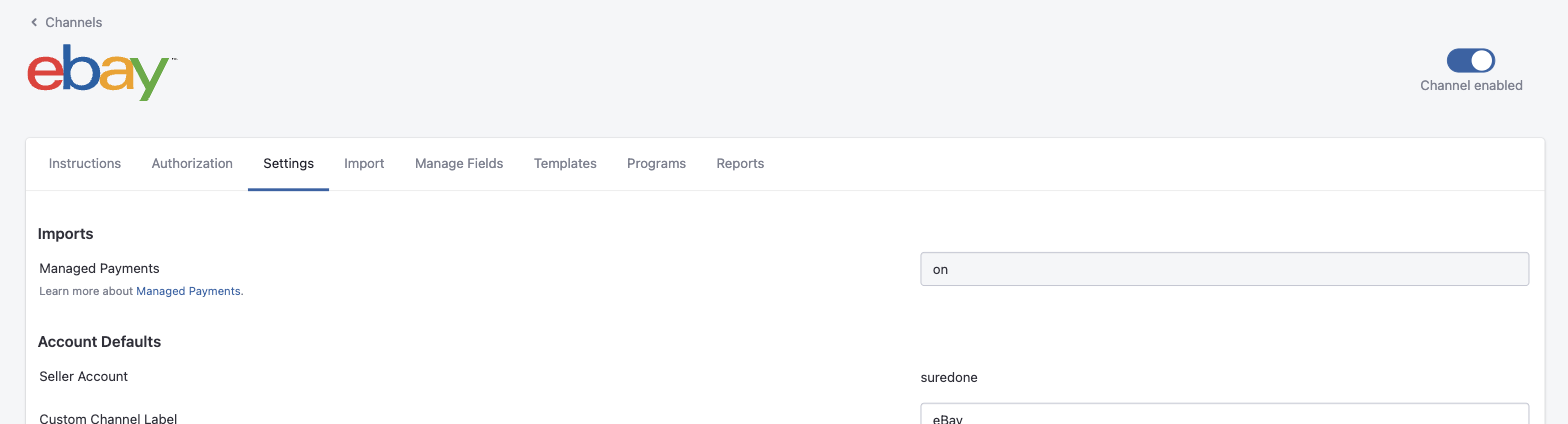
SureDone re-imports your business policies from eBay every time you open the eBay channel's Settings tab while the channel is authorized. There is no separate import button.
- In SureDone, open Channels in the left menu and click your eBay channel (eBay, or eBay 2, eBay 3 for additional instances).
- Click the Settings tab. If it was already open, reload the page.
- Scroll to Account Defaults. A policy you just created on eBay now appears in the Return Profile Default list.
Step 3: Set the account default
- In Channels > eBay > Settings > Account Defaults, find Return Profile Default.
- Open the dropdown and pick the policy. Each entry shows the policy name followed by its eBay policy ID in parentheses.
- Click View profile details under the dropdown if you need to check the IDs. The panel lists every imported return policy with its ID and name, and Copy to Clipboard copies the list for use in bulk files.
- Click Save Settings at the bottom of the page.
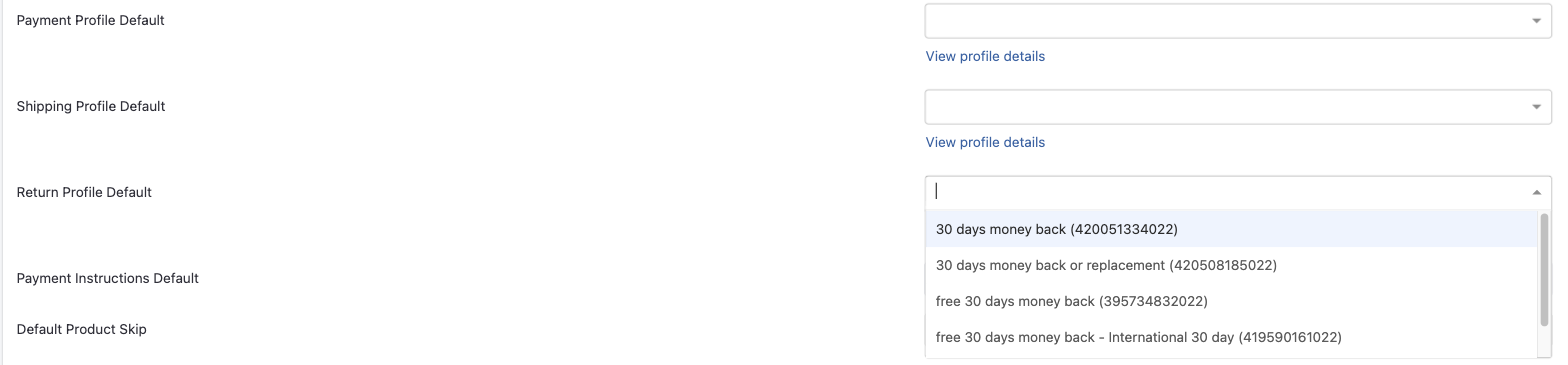
Set all three defaults. When an eBay seller uses business policies, eBay expects a payment policy, a shipping policy and a return policy on every listing. Set Payment Profile Default and Shipping Profile Default in the same section. Leaving one empty is the usual cause of eBay errors such as 21919154: Return policy is required and 21919152: Shipping policy is required.
The new default applies to products the next time they are listed or revised. Products that already carry their own Return Profile keep it.
If you are connecting a new eBay channel, the onboarding wizard that runs after authorization asks for the same three policies (Payment policy, Shipping policy, Return policy). Choosing them there sets these same defaults.
Override the return policy on a single product
- Open the product in the product editor.
- Go to the Shipping section and find the block headed with your eBay channel's name.
- Use the Return Profiledropdown:
- Pick a named policy to use that policy for this product only. Each entry shows the policy name and its eBay policy ID.
- Leave it on Don't Use Profile to follow the account default. Despite its name, this is the "no override" setting, not a way to switch return policies off.
- Save the product. SureDone revises the eBay listing with the new policy.
Do not use "Don't Use Profile" to send return terms without a policy. On a product that has never been listed, SureDone treats it as "follow the account default" and still sends the default policy. On a product that is already live, the same setting does drop the policy and send the legacy return fields instead. Because the two cases behave differently, the only dependable way to list without a return policy is to leave Return Profile Default empty in the channel settings as well.
Note: while a return policy is in effect for the product (its own or the account default), the legacy fields Accept Returns, Within, Refund Type, Shipping Paid By and Return Description are hidden in the editor, because eBay ignores them when a policy is sent.
Change the return policy on many products at once
Use the product field ebayreturnprofileid in a bulk file or through the API, with the eBay policy ID as the value. Get the ID from View profile details in the channel settings.
- For additional eBay instances add the instance number to the field name:
ebay2returnprofileid,ebay3returnprofileid. - An empty value, or
0, follows the account default. Sending0is not a reliable way to remove the policy from a listing, for the reason described above. - Products must be relisted or edited on eBay for the new policy to reach the listing. A bulk edit action does this for you.
The full bulk workflow, including payment and shipping profiles, is in How To: Update eBay Business Policies in Bulk.
Legacy return fields (not recommended)
Before business policies, return terms were stored field by field. These fields still exist, but they are hidden from the Settings page, eBay ignores them whenever a return policy is sent, and eBay now requires business policies for nearly all sellers. Keep them only if your eBay account is genuinely not opted in to business policies.
| What it controls | Product field (bulk / API) | Accepted values |
|---|---|---|
| Returns accepted | ebayreturnsreturnsaccepted | ReturnsAccepted, ReturnsNotAccepted |
| Return window | ebayreturnsreturnswithin | Days_14, Days_30, Days_60 |
| Refund type | ebayreturnsrefund | MoneyBack, MoneyBackOrExchange, MoneyBackOrReplacement |
| Return shipping paid by | ebayreturnsshippingcostpaidby | Buyer, Seller |
| Return policy details text | ebayreturnsdescription | Free text. Only sent on the German, Austrian, French, Italian and Spanish eBay sites. |
| International returns | ebayreturnsinternationalreturnsaccepted, ebayreturnsinternationalreturnswithin, ebayreturnsinternationalrefund, ebayreturnsinternationalshippingcostpaidby | Same values as the domestic fields. See eBay International Returns. |
The account-wide legacy defaults (ebay_returns_set, ebay_returns_days, ebay_returns_for, ebay_returns_shippaidby, ebay_returns_description and their ebay_returns_international_* counterparts) can only be changed through the settings API. They are the values the product editor shows as "Default" for the legacy fields.
Troubleshooting
- The policy I created on eBay is not in the dropdown. Reload the Settings tab of the same eBay instance. Check that the policy was created in the eBay account that instance is authorized with.
- The dropdown says "No options". SureDone could not import any policies. Make sure the channel is authorized (the Authorization tab) and that the eBay account is opted in to business policies.
- eBay error 21919154 "Return policy is required" or 21917329 "You've provided an invalid return policy". The listing was sent without a valid return policy. Set the Return Profile Default, or fix the product's Return Profile, and relist. See eBay Error Code 21917329.
- I changed the default but a listing still shows the old terms. The product has its own Return Profile set, or it has not been revised since the change. Check the product's Return Profile, then edit or relist it.