

The error, as it appears in SureDone
ErrorCode:21916587 ShortMessage: Missing name in name-value list. LongMessage: Missing name in the variation specifics or variation specifics set.
eBay returns this when a variation listing is sent with a child whose options do not line up with the listing's set of options. It only happens on variation (multi-SKU) listings, and almost always for one of the two reasons below.
Cause 1: a child is missing a value in one of your Variation Fields
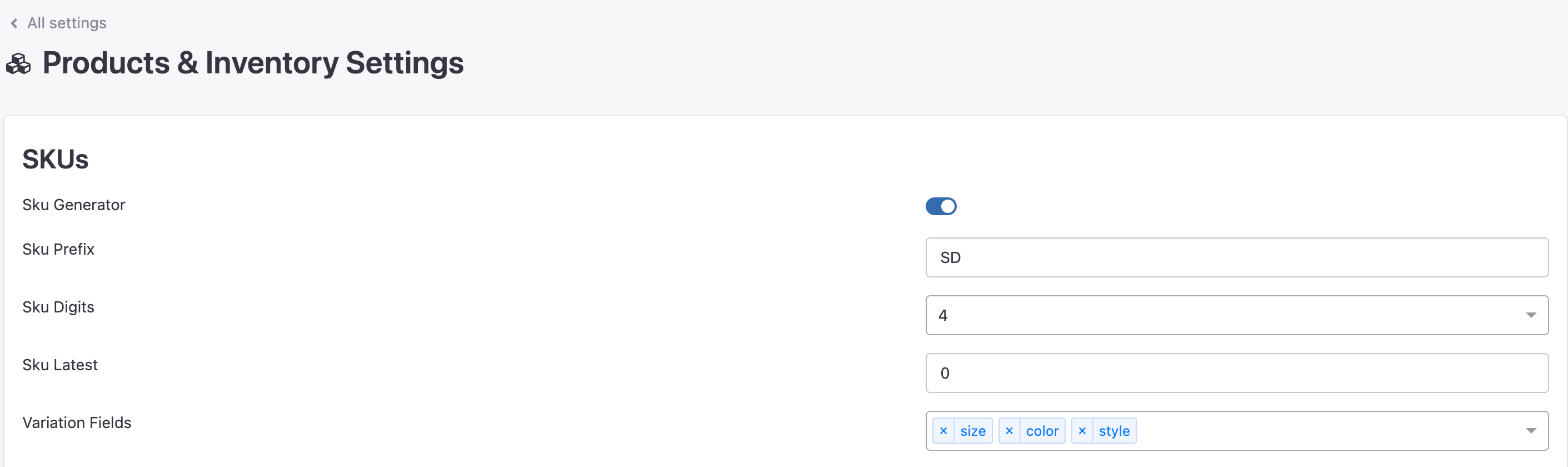
SureDone builds the eBay variation options from the fields chosen under Settings > Products & Inventory > Variation Fields, for example Color and Size. Every child in the family must have a value in every one of those fields.
If one child is blank in a field the others fill in, SureDone sends that child without that option while the listing as a whole still declares it, and eBay rejects the update. Four children with a Color, one with the Color field empty, is the classic case.
To fix it
- Check which fields are your Variation Fields in Settings > Products & Inventory, under SKUs.
- Open each child of the listing and make sure every one of those fields has a value. Look for blanks, and also for a value typed in a different field than the one configured.
- Edit or relist the parent so the corrected family is sent to eBay. Fixing the field alone does not update the listing.
Cause 2: the listing's structure changed after it went live
The same error appears when what SureDone sends no longer matches what eBay already has for a live listing. The usual triggers:
- You added a new child to a family that is already listed.
- You added a new Variation Field, such as Size, to a listing that was created with Color only.
- You renamed a Variation Field, or changed which fields are Variation Fields, since the listing was created.
SureDone does not add new children or new options to a live variation listing when it revises it. A new child is left out of the update, and if it is sent on its own it goes to eBay as a separate single-item listing.
To fix it
- Make sure every child, including the new one, has a value in every Variation Field.
- End the parent listing on eBay. In SureDone, use the eBay End action on the parent, or a bulk file with the parent's GUID and an action of end.
- Once it has ended, Relist the parent, through the eBay Relist action or a bulk action of relist. SureDone sends the parent and all of its current children to eBay as a fresh listing.
Ending and relisting creates a new eBay item number. The old listing's views, watchers and sales history stay with the old number, and the new listing starts from zero.
Less common causes
- A Variation Field named brand, UPC, ISBN or EAN. SureDone sends those as product identifiers, never as variation options. If one of them is among your Variation Fields it is silently skipped, and if it is the only one, the children have no options at all. Use a different field for the option, for example a custom field.
- A variation option with the same name as a required item specific. In some eBay categories a variation option cannot share its name with an item specific the category requires. If a listing fails with this error and the message is paired with a second one saying the names should be different, rename the field, for example Colors instead of Color, and relist.
- A child that is not really a child. A variation child shares the parent's SKU and has its own GUID. A product that merely looks similar, or a child that already carries its own eBay item number from an earlier single listing, is not included in the variation listing.
Things to know
- Changing an existing child's option value in SureDone, for example its Color, does not change it on eBay through a normal edit. To change the options of a live listing, end and relist it.
- If a variation has sold, eBay will not let it be removed from the listing. Set that child's stock to zero instead, and relist only if you need to change the listing's structure.
- Variation listings are only possible in eBay categories that support them. If the category does not, SureDone lists the parent as a single item and tells you so in a warning.