

The eBay Strikethrough Program is an invite-only program. If you have been selected to be a part of the program, you may use this feature through SureDone. If you have not been invited to the program, you can contact eBay to ask for an invitation to the program.
In order to show discounts for your eBay listings, you can use the Strikethrough Pricing Program. Each listing will show two prices, one “List Price” and one “Now” price. The "List Price" displays with a line striking through it. Buyers only pay the “Now” price. The listing also shows a "You save" amount, calculated as the total discount.

Turning on Strikethrough Pricing:
1. Click on Channels in the left navigation, then click the eBay instance you want to configure (e.g. eBay Main) to open its channel page.
2. Click the Settings tab.
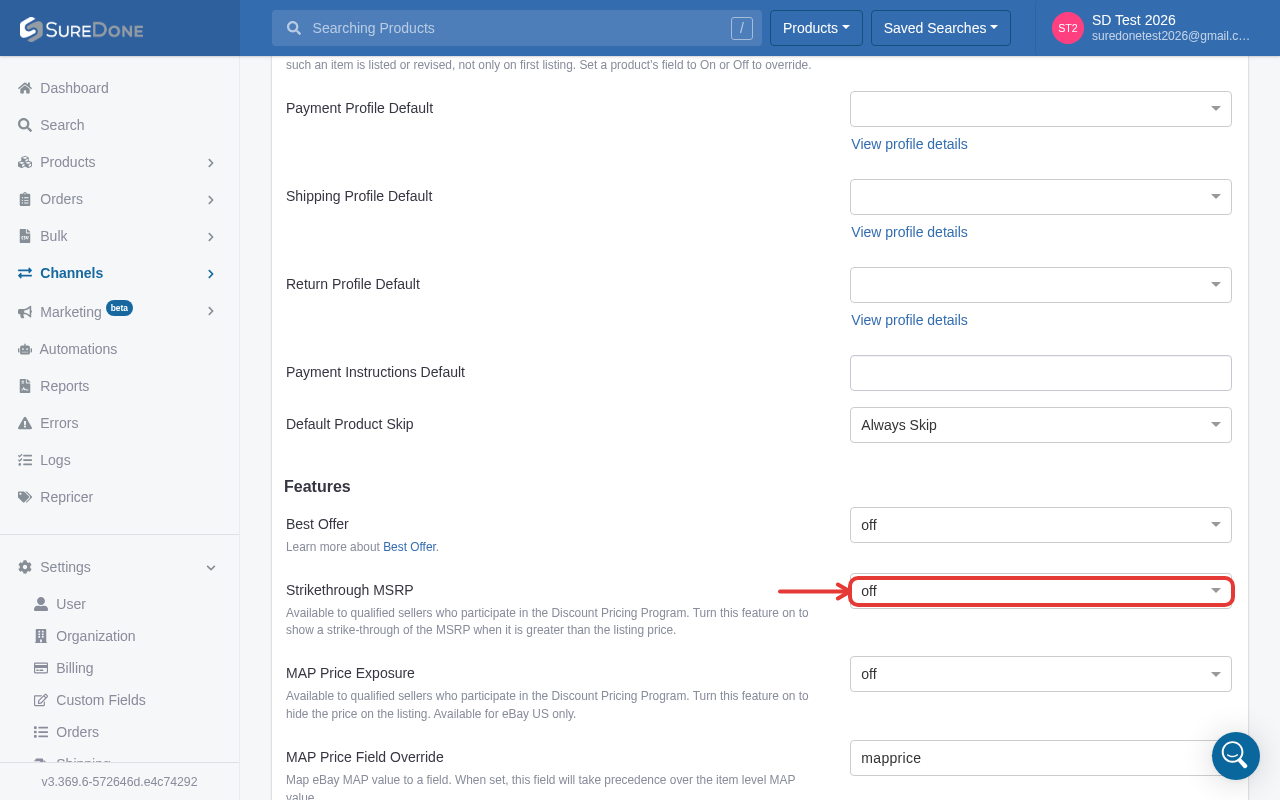
3. Scroll down to the Features section. You will see “Strikethrough MSRP” — use the dropdown to select on to enable it (this is a select field showing “on”/“off” rather than a toggle switch).
4. Scroll to the bottom of the page and click Save Settings to record your changes and you are ready to list.
Using Strikethrough when listing:

1. Enter the But it Now Price in Price field.
2. Enter the List Price in MSRP field.
Using Strikethrough in Bulk:
The Buy it Now price uses the “price” header field in our bulk file.
The List price uses the “msrp” header field in our bulk file.
If you want to edit these fields via bulk and the items are existing in SureDone and on eBay, then your bulk file should look like this:
